Having a Google Business Profile feels like being on Google. It’s not. Thousands of service businesses have a profile that technically exists but functionally does nothing because it doesn’t show up when customers search for their services.
Here’s a quick test to find out if your business isn’t showing up on Google Maps:
- Open an incognito browser window (three dots at the top of your browser and click “New Incognito Window.”
- Search for what you do plus your city. Not your business name, but your service. “Roofer in [city].” “Seller’s agent in [city].” “HVAC repair near me.”
If you’re not in the top three map results, your profile isn’t doing its job.
This guide explains why that happens and how to fix it. Eight specific problems, each with a diagnostic step and an action plan.
How Google Maps Works (And Why It Matters)
Before we dive into solutions, you need to understand how Google decides which businesses to show.
When someone searches for a service in your area, Google displays what’s called the “Local Pack,” those top three business listings that appear with the map. These positions are prime real estate. Being in the Local Pack means more visibility, more clicks, and more customers.
Google uses three main factors to determine which businesses make it into those top spots:
Relevance
How well does your business match what the person searched for? This is largely determined by your business category, description, and the services you list.
Distance
How close is your business to the searcher’s location? If you’re a service area business, Google looks at whether you serve their area.
Prominence
How well-known and trustworthy is your business? Google evaluates this through reviews, website authority, how complete your profile is, and how often people engage with your listing.
Here’s what many business owners don’t realize: just claiming your Google Business Profile doesn’t automatically make you visible. It’s the starting point, not the finish line. Your profile needs to be optimized, complete, and actively maintained to compete for visibility.
Now let’s look at why your business might be invisible, and what to do about it.
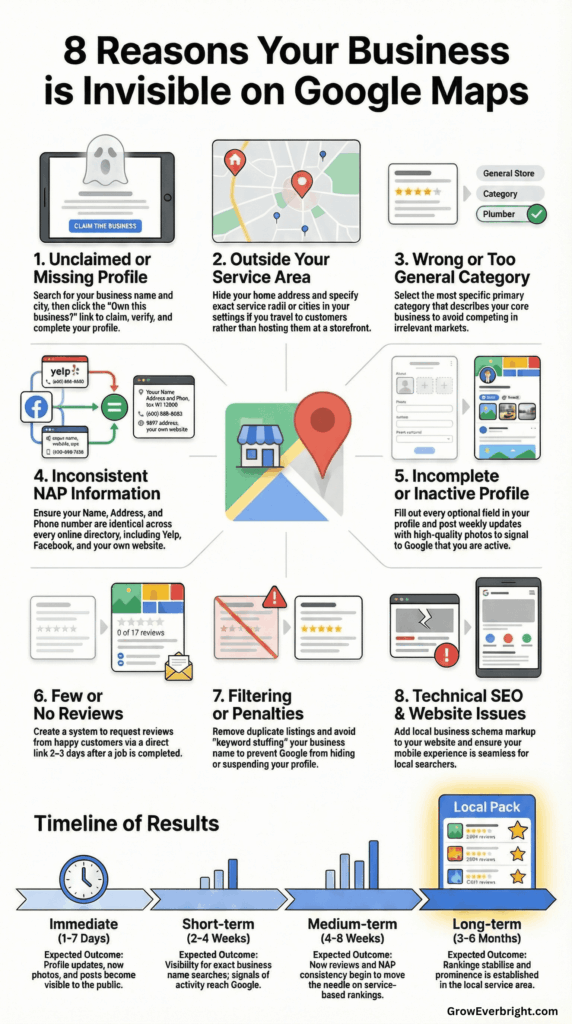
The 8 Reasons Your Business Isn’t Showing Up on Google Maps
Your best months happen when referrals are flowing. Your worst months happen when they’re not. Google Maps is the only channel that sends you customers who are ready to hire today, every single day, without you picking up the phone or asking anyone for a favor.
This blog walks you through every fix, but it’s a lot to hold in your head while you’re running a business. Download the free 7 Day Google Business Breakthrough and get seven things you can do to optimize your profile that take less than 10 minutes.
1. You Haven’t Claimed Your Google Business Profile (Or Don’t Have One Yet)
This sounds obvious, but it’s more common than you’d think. In many cases, Google automatically generates listings for businesses based on publicly available information. You might see your business when you search for your exact business name, but that doesn’t mean you’ve claimed and verified it. In other cases, your business may not have a listing at all, especially if you’re newer or haven’t had much of an online presence.
Either way, the result is the same: you’re invisible. If your listing exists but isn’t claimed, you can’t control the information displayed, respond to reviews, add photos, or optimize anything. You’re at the mercy of whatever Google scraped from the web. And if your listing doesn’t exist yet, Google has nothing to show searchers.
How to tell where you stand:
- Search for your business name + city on Google
- If your business appears, look for the “Own this business?” link—that means it exists but hasn’t been claimed
- If nothing comes up at all, you’ll need to create a profile from scratch
- Try logging into your Google Business Profile dashboard
- Check if you can edit information or respond to reviews
The fix:
Go to Get Listed on GBP and search for your business. If it exists but isn’t claimed, follow the prompts to claim it. If it doesn’t exist, you’ll be guided through creating a new profile. In either case, you’ll need to verify your business, which usually happens through a postcard mailed to your business address with a verification code. Some businesses can verify by phone or email.
If someone else has already claimed your business (this happens with former owners or employees), you’ll need to request access or prove ownership through Google’s support process.
Once verified, complete every section of your profile. Incomplete profiles rank lower and convert fewer visitors into customers.
2. Your Business Is Outside Your Service Area
Google prioritizes showing businesses that are close to the searcher. If you have a physical location that customers visit, Google will favor businesses nearest to where someone is searching.
But what if you’re a plumber, electrician, Realtor, or contractor who travels to customers? This is where service area businesses (SABs) come in. If you set up your profile incorrectly, you might be invisible to customers in areas you actually serve.
Common mistakes:
- Showing your home address when you should hide it
- Not setting up service areas at all
- Setting service areas too narrow (or too broad)
- Listing service areas that are too far from your actual location
The fix:
In your Google Business Profile, go to your service area settings. If customers come to you (like at a restaurant or retail store), you need a visible physical address. If you go to customers, you should hide your address and instead specify your service areas.
For service areas, you can choose:
- A radius around your location (e.g., 30 miles)
- Specific cities, zip codes, or regions
Be strategic here. It’s better to dominate a smaller service area than to spread yourself too thin trying to serve everywhere. Google is more likely to show you in areas where you have a concentration of activity, such as jobs completed, reviews from that area, and website content mentioning those locations.
If you serve multiple distinct areas, make sure your website has dedicated content for each location. This supports your service area claims and improves your chances of appearing in those searches.
3. Your Business Category Is Wrong or Too General
Your primary business category is one of the most important ranking factors for Google Maps. If you choose the wrong category, or one that’s too broad, you’ll either show up for irrelevant searches or not show up at all.
Let’s say you’re a plumber who specializes in commercial work. If you select “Contractor” as your primary category instead of “Plumber” or “Commercial Plumbing Service,” you won’t appear when someone searches for “commercial plumber near me.” You’ll be competing with every general contractor, which isn’t your market anyway.
The fix:
Review Google’s complete category list and select the most specific primary category that describes your core business. This is crucial. Don’t choose a category because you think it gets more searches; choose the one that most accurately represents what you do.
You can add multiple secondary categories to capture additional services, but your primary category should reflect your main business. For example:
- Primary: “Plumbing Service”
- Secondary: “Emergency Plumber,” “Water Heater Repair Service,” “Drain Cleaning Service”
Update your categories whenever your business focus changes. If you add new services or shift your specialty, adjust your categories to match.
4. Your NAP Information Is Inconsistent
NAP stands for Name, Address, and Phone number. Google cross-references your business information across hundreds of directories, websites, and databases. When your online information includes different addresses, old phone numbers, or variations in your business name, Google doesn’t know which version to trust.
Common NAP problems:
- Old addresses from previous locations still listed on directories
- Phone numbers that have changed
- Business name variations (Bob’s Plumbing vs. Bob’s Plumbing LLC vs. Bob’s Plumbing Services)
- Formatting differences (123 Main St. vs. 123 Main Street)
The fix:
First, audit your current citations. Search for your business name and check the top 20-30 results. Look for:
- Yelp
- Yellow Pages
- BBB
- Industry-specific directories
- Chamber of Commerce
- Local business directories
Document any inconsistencies you find. Then systematically update each listing to match your Google Business Profile exactly, character for character, including punctuation and formatting.
If you moved locations, make absolutely sure old addresses are updated everywhere. If you changed phone numbers, update every single listing. This process takes time, but it’s essential for visibility.
Major updates can take 4-8 weeks to fully impact your rankings as Google re-crawls and re-evaluates your information.
5. Your Profile Is Incomplete or Looks Inactive
Google rewards complete, active profiles with better visibility. If you claimed your profile years ago and haven’t touched it since, or if you’re missing key information, you’re signaling to Google that your business might be inactive or low-quality.
Think about it from a customer’s perspective: would you call a business with no photos, no reviews, no recent posts, and bare-minimum information? Probably not. Google thinks the same way.
What “complete” means:
- Business name, category, and contact information
- Complete and accurate service area or address
- Business hours (including special hours for holidays)
- Website URL
- Business description (all 750 characters)
- All relevant attributes (free estimates, online appointments, etc.)
- At least 10-15 high-quality photos
- Services or products listed
- Regular posts (at least weekly)
The fix:
Go through your Google Business Profile section by section and fill in everything. Don’t skip anything just because it’s optional. Each completed field is another signal to Google that your business is legitimate and active.
Add photos showing:
- Your team at work
- Completed projects or products
- Your vehicles (if applicable)
- Your workspace or storefront
- Before and after shots
- You interacting with customers
Create Google Posts at least once per week. Share updates about:
- Services you’re currently offering
- Seasonal specials or availability
- Recent projects (with photos)
- Helpful tips related to your industry
- Company news or milestones
Active profiles with regular updates and fresh content consistently rank higher than abandoned profiles.
You could spend a weekend filling in every field on your profile. But there’s a difference between complete and optimized. Which categories actually match how your customers search? Which search terms belong in your description? What should your Q&A say before someone ever picks up the phone?
If you’d rather hand this to someone who does it every day, the 72-Hour Profile Takeover gets it done in one shot. You give us 30 minutes on a call and your best photos. We give you back a fully optimized profile: description rewritten, categories dialed in, Q&A built out, photos geotagged, and a 60-day posting strategy ready to go. Learn more about it or book here.
Reason #6: You Have No Reviews (or Very Few)
Reviews are a major ranking factor for Google Maps. When someone searches for a service, Google looks at both the quantity and quality of reviews. Businesses with more positive reviews typically rank higher than those with few or no reviews.
Beyond rankings, reviews dramatically impact whether someone actually contacts you. Even if you appear in search results, people will choose a competitor with 50 five-star reviews over a business with zero reviews every time.
Why this happens:
- You’re not asking customers for reviews
- You’re asking at the wrong time
- You’re making it too complicated
- You’re afraid of negative reviews
- You don’t have a system
The fix:
Create a systematic approach to generating reviews. Here’s what works:
- Ask for reviews 2-3 days after completing a job, when the customer is still happy but has had time to see that everything’s working properly.
- Make it easy by sending customers a direct link to your Google Business Profile review page. Don’t make them search for you. The easier you make it, the more reviews you’ll get.
- Focus on customers who expressed satisfaction. If someone had a problem (even if you fixed it), they might not be the best candidate for a review.
- Respond to every review. Thank customers for positive reviews. Address negative reviews professionally and show you’re committed to making things right. Your responses show future customers how you handle issues.
- Be consistent. Steady, ongoing review generation is better than sporadic bursts.
Never buy fake reviews or incentivize reviews with discounts. Google can detect fake reviews, and it will hurt your rankings or get you suspended.
Reason #7: You’re Being Filtered or Penalized
Sometimes your business isn’t showing up because Google has filtered, suspended, or penalized your listing. This is more common than most business owners realize, and it often happens without any notification.
Common reasons for filtering or penalties:
- Duplicate listings for the same business
- Multiple businesses at the same address (Google may filter all but one)
- Keyword stuffing in your business name
- Buying fake reviews or review manipulation
- Listing prohibited or restricted business types
- Violating Google’s guidelines (even unintentionally)
How to tell if you’re suspended:
Log in to your Google Business Profile dashboard. If you’re suspended, you’ll see a notification. Your listing might also disappear from Google Maps and search results entirely.
If you’re being filtered (not suspended but hidden), you might show up when people search your exact business name, but not for service-based searches.
How to Fix It
For duplicate listings
Search for your business name thoroughly. If you find multiple listings for the same location, you need to mark the duplicates as closed or request removal. Keep only the verified, complete listing.
For suspension
Review Google’s guidelines to identify what might have caused the suspension. Common violations include keyword-stuffed business names (like “Bob’s Plumbing – Best Emergency Plumber in Jacksonville”). Your business name should be just your actual business name, nothing more.
Submit a reinstatement request through your Google Business Profile dashboard, explaining what caused the issue and how you’ve fixed it. Be honest and specific. These requests can take 3-7 days (or longer) to process.
For multiple businesses at one address
If you run multiple businesses from the same location, make sure each has a distinct phone number, website, and a clear differentiator. Google may still filter some businesses, especially if they seem like they’re trying to game the system.
Prevention is better than the cure. Follow Google’s guidelines strictly, even if you see competitors bending the rules.
Reason #8: Technical SEO Issues or Poor Website Signals
Your Google Business Profile doesn’t exist in isolation. Google looks at your website to verify information, understand your business, and determine trustworthiness. If your website doesn’t support your Google Business Profile, or worse, contradicts it, you’ll struggle with visibility.
Common website issues:
- NAP information doesn’t match your Google Business Profile
- No location or service area information on your website
- Missing or incorrect local business schema markup
- Poor mobile experience (80% of local searches happen on mobile)
- No connection between your website and Google Business Profile
- Thin content that doesn’t establish expertise or relevance
How to Fix It
Match your NAP exactly
Your website’s contact page should display your business name, address, and phone number exactly as they appear on your Google Business Profile. Put this information in your footer on every page.
Add local business schema
Schema markup is code that helps Google understand your business information. Use schema to mark up your NAP, business type, service areas, hours, and more. You can use Google’s Structured Data Markup Helper or plugins like Schema Pro if you’re on WordPress.
Create location-specific content
If you serve multiple areas, create dedicated pages for each location with unique content. Don’t just duplicate the same content and swap out city names, but write genuinely useful information for each area.
Optimize for mobile
Test your website on multiple mobile devices. It should load quickly, be easy to navigate with a thumb, and have click-to-call buttons prominently displayed. Google prioritizes mobile-friendly sites in local search.
Link your profiles
Add a link to your Google Business Profile on your website (usually in the footer). Link your website from your Google Business Profile. This bi-directional connection helps Google verify your business.
Create content that demonstrates expertise
Write blog posts, FAQs, or guides that show you know your industry. This content can help you rank for service-based searches and support your overall local SEO efforts.
Quick Diagnostic Checklist: Identify Your Problem
Use this checklist to figure out which issues are affecting your visibility:
☐ Check #1: Search for [your business name] + [your city]
- Do you appear in the Local Pack or Knowledge Panel?
- Is your information correct?
- If you don’t appear: Your profile might not be claimed, verified, or you could be suspended.
☐ Check #2: Search for [your service] + [your city]
- Do you appear in the Local Pack?
- Who are your competitors that DO appear?
- If you don’t appear: Category issues, service area problems, or lack of prominence (reviews/engagement).
☐ Check #3: Log into your Google Business Profile dashboard
- Any warnings or notifications?
- Is your profile 100% complete?
- When was your last post or update?
- If incomplete or warnings: Address immediately.
☐ Check #4: Search for your business from incognito mode
- Does your visibility change?
- If different results: Google is personalizing based on your search history; the incognito results are what real customers see.
☐ Check #5: Ask someone in your service area to search
- Have a friend or customer search from their location
- Do you appear for them?
- If you appear for some locations but not others: Service area configuration issue.
☐ Check #6: Review your NAP across directories
- Search “[your business name]” and check the first 20 results
- Document any inconsistencies
- If inconsistent: This is likely hurting your rankings significantly.
☐ Check #7: Count your reviews
- How many do you have?
- Compare to competitors who ARE showing up
- If significantly fewer: Focus on review generation immediately.
☐ Check #8: Verify your website
- Does your NAP match your Google Business Profile?
- Is your site mobile-friendly?
- Does it mention your service areas?
- If mismatched or a poor mobile experience: Fix these technical issues.
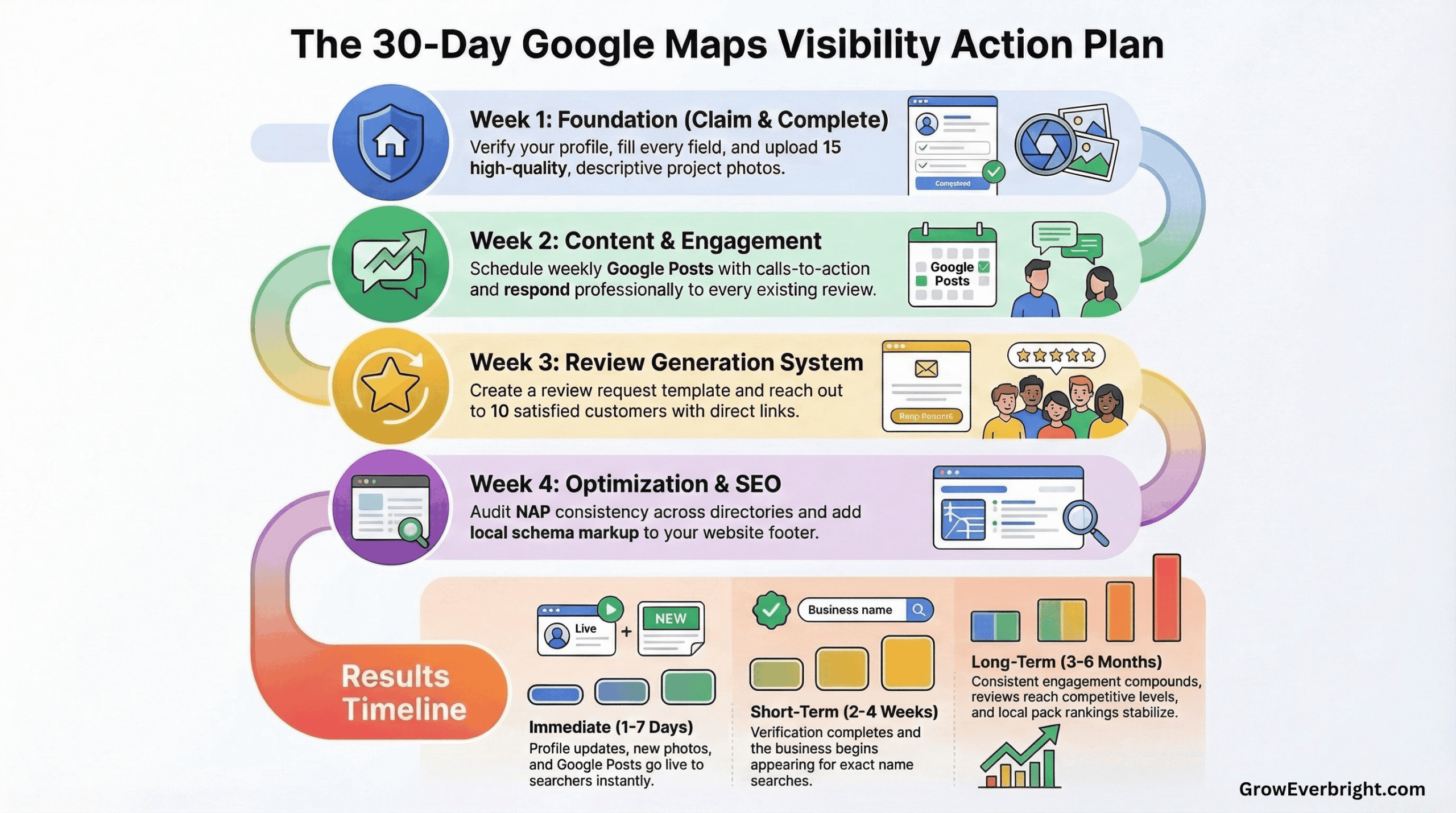
The 30-Day Action Plan to Get Visible
Follow this timeline to systematically fix your visibility issues and start showing up on Google Maps.
Week 1: Foundation
Day 1-2: Claim and verify your profile (if not already done)
- Go through the complete verification process
- Choose the verification method that works best for you
- Wait for verification (can take 5-14 days)
Day 3-4: Complete your profile 100%
- Fill in every section, leaving nothing blank
- Write a compelling 750-character business description
- Add your website, phone number, and hours
- Set up service areas or confirm your address
- Select primary and secondary categories carefully
Day 5-7: Add photos and visual content
- Upload at least 10-15 high-quality photos
- Include team photos, work examples, location shots
- Make sure photos are well-lit, professional, and relevant
- Name your photo files with descriptive keywords before uploading
Week 2: Content & Engagement
Day 8-10: Create your first Google Posts
- Write 4 posts to schedule throughout the week
- Include clear calls-to-action
- Add photos to each post
- Focus on services, offers, or helpful tips
Day 11-12: Respond to all existing reviews
- Thank customers for positive reviews
- Address negative reviews professionally
- Show you’re engaged and responsive
- If you have no reviews yet, that’s okay—focus on generating them next week
Day 13-14: Optimize your business attributes
- Enable all relevant attributes (free estimates, online appointments, etc.)
- Add service offerings or products
- Set up the Q&A section with common questions
- Answer any existing questions customers have asked
Week 3: Review Generation
Day 15-17: Set up your review request system
- Create a review request email template
- Get your direct Google review link
- Plan when in your customer journey you’ll ask
- Make sure your team knows the process
Day 18-21: Request your first batch of reviews
- Identify 10 recent happy customers
- Send personalized review requests
- Follow up once if needed (gently)
- Track who responds and who doesn’t
Week 4: Optimization & Monitoring
Day 22-24: Audit and fix your NAP consistency
- Check top 20 directories and citations
- Create a spreadsheet tracking where you’re listed
- Update any inconsistencies
- Submit correction requests to major directories
Day 25-27: Optimize your website
- Ensure NAP matches your Google Business Profile exactly
- Add local business schema markup
- Create or update location/service area pages
- Improve mobile experience if needed
Day 28-30: Monitor and measure
- Check your Google Business Profile insights
- See how people are finding you
- Note which searches are bringing views
- Identify gaps or opportunities
- Schedule your posts for the next month
You run a business because you’re good at the work, not because you love sitting at a computer researching SEO tactics. So don’t. The 20-Day Google Authority Blitz takes everything above and breaks it into one short, specific task delivered to your inbox each weekday morning.
Ten minutes over coffee before your first job. No research, just do today’s task and move on. In 20 days, your profile, citations, and review system will be built and working. Start the 20-Day Blitz.
When to Expect Results
Understanding timelines helps you stay patient and committed to the process.
Immediate (1-7 days):
- Profile updates appear
- Photos become visible
- Posts go live
Short-term (2-4 weeks):
- After verification, your business should appear when people search your exact business name
- Profile completeness starts influencing how often you appear
- New photos and posts signal activity to Google
Medium-term (4-8 weeks):
- Reviews start accumulating and impacting rankings
- NAP consistency corrections begin improving trust signals
- You may start appearing in local pack for some service-based searches
- Category and service area optimizations take effect
Long-term (3-6 months):
- Consistent posting and engagement compound
- Review accumulation reaches competitive levels
- Website signals and schema start supporting your profile
- You establish prominence in your service area
- Rankings stabilize and typically improve
Results vary significantly based on:
- How competitive your market is
- How many issues you’re fixing
- How consistent you are with updates and engagement
- The strength of your competitors’ profiles
The key is consistency. Quick fixes don’t exist in local SEO, but strategic, sustained effort produces reliable results.
Common Mistakes That Make Things Worse
Avoid these practices that can damage your visibility or get you penalized:
❌ Keyword stuffing your business name
DON’T: “Bob’s Plumbing – Best Emergency Plumber Jacksonville FL 24/7”
DO: “Bob’s Plumbing” Use your actual business name only. Google considers keyword-stuffed names a violation.
❌ Creating multiple listings
Some businesses think creating multiple profiles increases their chances. It doesn’t. It confuses Google and can get all your listings suspended.
❌ Buying fake reviews
Google’s algorithms detect fake reviews. Even if they slip through initially, they’ll eventually be removed, which can result in penalties.
❌ Using a virtual office or PO Box (for non-SABs)
If customers visit your location, you need a real, verifiable business address. Virtual offices can get you suspended.
❌ Changing information frequently
Don’t keep changing your business name, category, or location, hoping to rank better. Consistency signals legitimacy.
❌ Ignoring guideline violations
If Google notifies you of issues, address them immediately. Ignoring warnings can lead to suspension.
❌ Only optimizing once
Your competitors are continuously improving their profiles. If you optimize once and stop, you’ll fall behind.
Frequently Asked Questions
How long does it take for my business to show up on Google Maps after claiming it?
After verification, your business typically appears when people search your exact business name within a few days. However, appearing prominently for service-based searches (like “plumber near me”) takes longer, usually 4-8 weeks of consistent optimization, depending on competition.
Why does my business show up for some searches but not others?
Google shows different businesses based on relevance to the search term, distance from the searcher, and prominence (reviews, engagement, authority). You might rank well for your business name but not for service-based searches if your categories, content, or prominence aren’t competitive enough.
Can I show up on Google Maps if I don’t have a physical storefront?
Absolutely. Service area businesses (SABs), like plumbers, electricians, contractors, and mobile services, can hide their address and show up based on the service areas they specify. Many successful businesses on Google Maps are service area businesses.
Do I need a website to appear on Google Maps?
Technically, no, but having a website significantly improves your chances of ranking higher. Google uses your website as a trust signal and to verify your business information. Businesses with websites consistently outperform those without.
How many reviews do I need to rank on Google Maps?
There’s no magic number. You generally need more (and more recent) reviews than your competitors in the same category and location. Focus on consistently generating reviews rather than hitting a specific number. The goal is to accumulate reviews steadily over time.
What should I do if my competitor is violating Google’s guidelines but ranking higher?
Report guideline violations through the “Suggest an edit” feature on their profile. However, focus primarily on optimizing your own profile rather than trying to take down competitors. Google eventually catches violations, and your legitimate efforts will outlast shortcuts.